关于这个项目
用可视化画布编排模型、工具和数据,快速验证 Agent 应用想法。
适合在隔离环境中先完成小规模 PoC:准备代表性数据,核对原仓库的运行依赖和许可,记录任务成功率、响应时间、成本与失败样例。部署方式和兼容版本请以原项目文档为准。
接入思路
01业务接口与访问控制02模型 / 检索 / 工具编排03数据与运行可观测性
以上为 FDE前线 建议的应用接入层次,项目内部架构请查阅原作者文档。
开始使用
建议固定版本,在隔离环境中复现原项目 Quick Start,记录依赖、模型服务和数据权限。本站仅索引原项目,不托管或执行仓库代码。
原项目部署文档展开同步的 README 纯文本
<!-- markdownlint-disable MD030 --> <picture> <source media="(prefers-color-scheme: dark)" srcset="./docs/static/img/langflow-logo-color-blue-bg.svg"> <img src="./docs/static/img/langflow-logo-color-black-solid.svg" alt="Langflow logo"> </picture> [](https://github.com/langflow-ai/langflow/releases) [](https://opensource.org/licenses/MIT) [](https://pypistats.org/packages/langflow) [](https://twitter.com/langflow_ai) [](https://www.youtube.com/@Langflow) [](https://discord.gg/EqksyE2EX9) [](https://deepwiki.com/langflow-ai/langflow) [Langflow](https://langflow.org) is a powerful platform for building and deploying AI-powered agents and workflows. It provides developers with both a visual authoring experience and built-in API and MCP servers that turn every workflow into a tool that can be integrated into applications built on any framework or stack. Langflow comes with batteries included and supports all major LLMs, vector databases and a growing library of AI tools. ## ✨ Highlight features - **Visual builder interface** to quickly get started and iterate. - **Source code access** lets you customize any component using Python. - **Interactive playground** to immediately test and refine your flows with step-by-step control. - **Multi-agent orchestration** with conversation management and retrieval. - **Deploy as an API** or export as JSON for Python apps. - **Deploy as an MCP server** and turn your flows into tools for MCP clients. - **Observability** with LangSmith, LangFuse and other integrations. - **Enterprise-ready** security and scalability. ## 🖥️ Langflow Desktop Langflow Desktop is the easiest way to get started with Langflow. All dependencies are included, so you don't need to manage Python environments or install packages manually. Available for Windows and macOS. [📥 Download Langflow Desktop](https://www.langflow.org/desktop) ## ⚡️ Quickstart ### Install locally (recommended) Requires Python 3.10–3.14 and [uv](https://docs.astral.sh/uv/getting-started/installation/) (recommended package manager). #### Install From a fresh directory, run: ```shell uv pip install langflow -U ``` The latest Langflow package is installed. For more information, see [Install and run the Langflow OSS Python package](https://docs.langflow.org/get-started-installation#install-and-run-the-langflow-oss-python-package). #### Run Official release packages and tagged source archives disable automatic login by default. Set `LANGFLOW_SUPERUSER_PASSWORD` before starting Langflow, then sign in with the username `langflow` (or your configured `LANGFLOW_SUPERUSER`). Development branches retain automatic login by default. See [authentication configuration](https://docs.langflow.org/api-keys-and-authentication#start-a-langflow-server-with-authentication-enabled). To start Langflow, run: ```shell uv run langflow run ``` Langflow starts at http://127.0.0.1:7860. That's it! You're ready to build with Langflow! 🎉 ## 📦 Other install options ### Run from source If you've cloned this repository and want to contribute, run this command from the repository root: ```shell make run_cli ``` For more information, see [DEVELOPMENT.md](./DEVELOPMENT.md). ### Docker Set and export a strong password before starting the container (Bash): ```shell read -rsp "Langflow administrator password: " LANGFLOW_SUPERUSER_PASSWORD; echo export LANGFLOW_SUPERUSER_PASSWORD docker run -p 7860:7860 -e LANGFLOW_SUPERUSER_PASSWORD langflowai/langflow:latest ``` Langflow is available at http://localhost:7860/. Sign in as `langflow` with the password you entered. Official Docker images require authentication by default. If you already have an auto-login installation, follow the [upgrade instructions](https://docs.langflow.org/api-keys-and-authentication#upgrade-from-auto-login) before switching defaults. For configuration options, see the [Docker deployment guide](https://docs.langflow.org/deployment-docker). ## 🛡️ Security For security information, see our [Security Policy](./SECURITY.md). ## 🚀 Deployment Langflow is completely open source and you can deploy it to all major deployment clouds. To learn how to deploy Langflow, see our [Langflow deployment guides](https://docs.langflow.org/deployment-overview). ## ⭐ Stay up-to-date Star Langflow on GitHub to be instantly notified of new releases.  ## 👋 Contribute We welcome contributions from developers of all levels. If you'd like to contribute, please check our [contributing guidelines](./CONTRIBUTING.md) and help make Langflow more accessible. --- [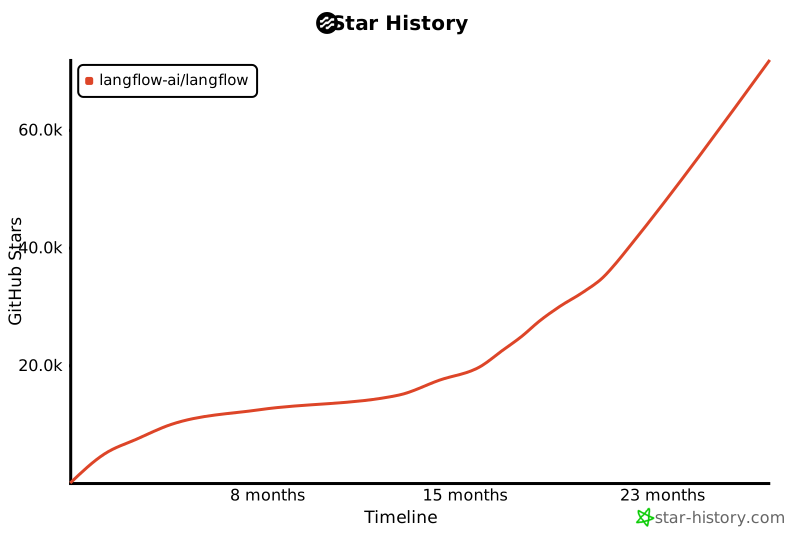](https://star-history.com/#langflow-ai/langflow&Date) ## ❤️ Contributors [](https://github.com/langflow-ai/langflow/graphs/contributors)
社区讨论 0 条公开讨论
分享你的复现经验、适用场景或遇到的问题。
登录参与讨论